

From the Founder's Desk
MobileFirst-Personla Websites Newsletter
January 14, 2025
2025 - Jan - 14 |
 |
Harnessing AI for Mobile-First Websites, Pages, Forms, Newsletters, and Posts Like countless other products and services, MobileFirst-Personal Websites has seamlessly integrated AI capabilities into its essential framework. The platform allows for the creation of an entire website via a keyword, the development of a page at a time, or the utilization of AI to generate an entry for a form field. I, myself, often leverage the power of AI, particularly when it is practical. However, I find that it's more effective to provide the AI engine with some direction rather than allowing it to generate full entries without ensuring their relevance. While AI bots and chat engines can fabricate a response to almost any prompt, a phenomenon known as 'AI hallucination' can occur - the AI delivers what appears to be a valid response, yet it bears no relevance to the original prompt. In the section below, "MobileFirst-Personal Websites AI Implementation," we delve into the diverse ways to utilize the AI engine within our platform. It can construct an entire website, a single page, or generate text entries for you. However, a word of caution here, as letting AI generate all your content can be risky due to 'AI hallucination.' Always proofread and verify the content generated by AI to ensure it delivers valid responses. Personally, I don't allow AI to generate a response from a single keyword or small text. I recently joined a Mastermind group that encourages a more effective way to harness AI power. The secret? Provide the AI engine with substantial and relevant information to work with. As I compile each weekly newsletter, I personally craft the content I wish to deliver. In the founder's message, I have the freedom to convey what I feel is crucial for the clients of our platform to comprehend. I initiate each founder's message from the ground up, without resorting to AI before I have thoroughly written out the ideas I wish to convey. Only then do I allow AI to step in. I use it to refine and enhance the ideas and concepts to ensure a more engaging and entertaining read than my initial draft. Instead of relying solely on AI to write an article from a single keyword, I dedicate time to penning my thoughts and refining them before I use AI to elevate the piece. This approach extends to creating a lead page, a bridge page, a blog, newsletter article, or website page improvement. The true power of AI lies not in letting it operate independently in a vacuum, but in guiding its functionality as much as possible before we allow it to assist. And remember, always review the responses you receive for accuracy - 'AI hallucination' is a real concern. Take the time to read the response before pasting it directly to where you plan on using it. Never blindly accept the data AI has generated or leave the page unread. Quality control is vital to ensure error-free results. Steve Pond Founder: MobileFirst-Personal Websites For this week only, I am including the "rough copy" that I wrote and then gave, in its entirety, to the AI Claude 3 - Haiku engine to rework with the following prompt instructions: "Please rewrite and improve this article for the founders message of my current AI issue. Improve the way it reads, and make it more enjoyable; but keep the main focus and points as much as possible. The original text I wrote is below the dotted line for your reference. ----------------------------------------------------------------------------------------------- Using AI for Mobile First Websites, Pages, Forms Newsletters and Posts Like almost every other product and program, MobileFirst-Personal Websites has integrated AI capabilities into its very structures. You can create a whole website with a keyword, develop a page at a time, or use AI to generate an entry for a form field entry. I use the power of AI all the time, when it makes sense, but I find that it is much better to give the engine something to work with, not allow the AI to deliver complete entries without making sure they make sense. While AI bots and chat engines are able to fabricate a response from almost every prompt, there is a phenomenon called hallucination - where the AI returns what appears to be a valid response, but it is not even close to what is asked. The section below "MobileFirst-Personal Websites AI implementation" goes through the various ways to use the AI engine within the platform. It can create an entire website using AI, a single page, or in most text fields it can create an entry for you. Many people have begun to get lazy and allow the AI to generate the text they are delivering to their readers, but there is some inherent danger in that. As mentioned previously, the AI can hallucinate an answer where it creates text but it may not be relevant. Just a warning, read all content that is generated by AI, make sure it is actually delivering valid responses. Personally, I don't allow AI to generate a response from a single keyword or small text. I recently joined a very powerful Mastermind group to my regular routine that gives a much more useful (for me) way to exploit AI power. The secret - give the AI engine something useful to work with. As I develop each weekly newsletter, I personally write what I want to deliver. In the founders message, I am given a clean slate to offer what I feel is important for the client of the platform to understand. I write each founder's message from scratch, no AI is even contemplated before the ideas I want to offer are written into the article. It is only after that where the AI is given a prompt. I tell it that I require it to polish and improve the ideas and concept for the people to have a more interesting and entertaining read than the original text that I wrote. Instead of offering a single keyword from the AI to write an article for me, I take the time to put my thoughts on paper and hone them a bit before I use AI to improve the article. It is the same process to create a lead page, a bridge page or a blog, newsletter article or website page improvement. I have learned the power of AI is not in letting it do its thing all by itself in a vacuum, rather give it as much direction as possible before we are allowing it to help. AND, be aware that responses you get may not be the most accurate - AI hallucination is a real thing. Always take a few minutes to read the response before blindly copy and pasting it to the place you plan on using it. Never blindly accept the field data AI has returned or leave the page unread. Too many places for error are there, and simply monitoring the quality of the responses is very important. Steve Pond Founder: MobileFirst-Personal Websites |
 |
Quote Of The Day |
"Design is not just what it looks like and feels like. Design is how it works." - Steve Jobs |
MobileFirst-Personal Websites AI Implementation |
The MobileFirst-Personal Websites platform is constantly evolving, with AI capabilities interwoven throughout its infrastructure. Whether it's crafting an entire website, developing individual pages, or generating text fields in various widgets, AI is an integral part of our platform. AI Templates: The Key to Customization Our AI templates are designed with several customizable fields, allowing you to create a personalized website that aligns with your brand or business. The template requires basic information such as the site or business name, a keyword or topic, and a logo or image from our free library. Based on these inputs, the AI constructs a website, automatically generating pertinent pages. You also have the option to add more pages or define the category of images to be used. AI Page Builder: A Practical Tool Another facet of AI integration is the AI Page Builder, a practical tool for swiftly adding new pages to an existing site. Simply select the "Create a new page with A.I." option and provide the necessary information. The AI then takes over, crafting a new page while you sit back and relax. AI Field Entry: Streamlining the Process Another key feature is AI Field Entry. When no text is entered, a prompt appears saying "Generate text with AI", streamlining the process of content creation. Moreover, the platform can translate existing text, facilitating the creation of truly multilingual sites. AI in Blogging: Content at Your Fingertips Blogs are a vital component of many websites, often serving as the primary source of content for SEO purposes. The Blog widget simplifies blog creation, offering three methods for updating content: 1) Manually entering unique content. 2) Generating content directly using AI. 3) Auto-blogging – this feature instructs our AI Assistant to regularly produce blog posts on topics of your choice. Regardless of the method, always review the AI-generated content to ensure its relevance and accuracy. A Word of Caution While AI is an invaluable tool, it should be used judiciously. This is particularly true for niche topics that may lack extensive content on the internet. In such cases, it's best to write the initial content yourself and then use AI to refine the grammar and spelling. This two-pronged approach ensures that your unique insights and expertise are preserved while benefiting from AI's proficiency in enhancing readability and engagement. In conclusion, while AI has significantly simplified website creation, it's crucial to retain a hands-on approach, particularly when it comes to content creation. After all, your website is an extension of your brand, and it's the human touch that makes it truly unique. ---------------------------------------------------------------------------------------------- (Original text before AI) MobileFirst-Personal Websites AI Implementation The actual platform has AI infused throughout it, and is adding more as time goes by. You can create an entire AI website using the templates that have been created for this purpose. You can create an entire page using AI and you can use AI to generate text fields in a number of widgets, such as Content block and Blog. The blog widget also has an instance where AI can be used to autogenerate blog posts using the AI capabilities of the platform. AI Templates The AI Template offers a number of fields that require information before the site can be created. These include the site or business name to be used as the site's identification. The Topic is basically a keyword that allows the site to be formulated along a particular topic or niche. Most of the site is for a specific business and should have the logo selected. Otherwise, you could browse the free image library to find an appropriate graphic for the look and feel of the new site. The site is constructed with a number of pages automatically as the AI creates the content, but you can add additional pages to the site . Finally you can define the images category that you require the site to use for its graphics selection. AI Page Builder A second way that AI has been built into the site editor is to allow a single page to be added to a created site. This is one of the most common ways to quickly build a new page on some related topic for the site. It is easy to do, simply click the arrow on the right of the "Create a New Page" button and select the "Create a new page with A.I." option on the top. When you do, a new dialog box opens for you to fill out with various required information and a series of page definitions for the page to follow. Once the fields have been filled out, a new page is built with the power of AI doing all the heavy lifting AI Field Entry The final integration with AI at the present moment is the field generation using the power of AI. In most cases the integration is displayed with a black box with white text saying "Generate text with AI". This is used when there is no text already entered. When text is there, you might want to have it translated, so there is also a button that states "Translate with AI". This is a powerful extension of the use of AI in websites that allows the creation of truly multi-lingual sites. While there are lots of places where AI can be used in the course of site creation and modification, these are mainly identified by the black button labeled "Create with AI", there is one other place where AI is being used in a special way. AI in the Blog Widget The blog is an important part of many websites since it the place where much of the true content is created and used by Google for SEO. The blog widget allows you to easily create a blog and add it to the rest of the blog posts you make over time. It is one of the main places where the ongoing addition to the site is a common occurrence. The blog can be updated in three ways. In all these cases, I recommend that AI be used sparingly, and to perfect and polish the text that you are publishing. It is fine to have an AI engine build text for topics that are quite common and well supplied on the internet, but be careful when you are working with smaller and more obscure niches that don't get as much of the content creation as the major ones These off the track niches are where the real information is often still in the hands of the site owner, and it is best to create the content from scratch - reread it for accuracy before submitting the full copy to the AI for its rework to make the actual text more coherent or entertaining. AI is very good at this, so it really is the best of both worlds. Get your ideas on "paper" and then let AI fix the actual grammar and spelling without treading too heavily on the actual subject you are offering. |
Joke Of The Day |
Why did the mobile first website go to therapy? Because it had too many issues with its responsiveness! |
One of the major challenges for anyone trying to create a website using traditional website editors is the overwhelming complexity and lack of structure. Most traditional editors like WordPress have evolved in an unstructured environment where anyone can create plugins, templates, or widgets without adhering to a rigid framework. This vast array of solutions has led to mass confusion for the average user, requiring the expertise of a trained website developer to navigate the convoluted structures - often at a significant cost.
In contrast, the Mobile-First approach to website building was not developed in this unstructured environment. Mobile-First website platforms are structured around a page-building model that treats each page as a self-contained entity. This approach offers several key advantages:
1. Clarity and Simplicity: The page-building structure provides a clear, easy-to-understand and learn interface, allowing even those with minimal technical expertise to build a professional-looking website on their own, without the need for expensive developers or programmers.
2. Faster Loading and Efficiency: Since each page is considered a separate entity, they load faster and have fewer invisible "strings" attached, making Mobile-First websites some of the fastest and most responsive on the web.
3. Intuitive Navigation: The page structure automatically controls the navigation menus. As pages are added, the top-level pages become the main menu, and sub-pages are automatically added as sub-menus. Rearranging the menu structure is as simple as clicking, dragging, and dropping the pages into the desired order.
4. Seamless Scalability: The page-building approach allows for easy expansion and modification of the website. Adding new pages or reorganizing the site structure can be done with minimal effort, ensuring your website can grow and evolve with your needs.
By leveraging the structured, page-building approach of Mobile-First website platforms, anyone with basic computer skills can create a visually appealing, fast-loading, and easily navigable website without the complexity and cost associated with traditional website editors. |
Mastering the Style Option: Controlling the Website without Coding
|
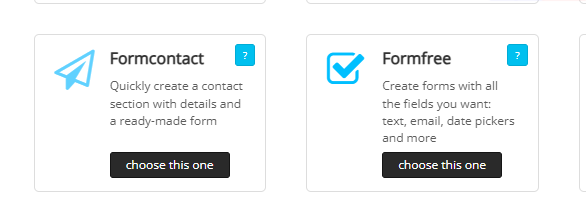
Exploring the Form Builder Duo In the ever-evolving world of website creation, widgets play a pivotal role in enhancing the user experience and functionality. This week, we shine the spotlight on the dynamic duo of form builder widgets – Formcontact and Formfree. The Formcontact Widget: Streamlining Contact Interactions The Formcontact widget comes with a pre-defined set of fields essential for establishing user-webmaster connections. These fields typically include the user's name, email address, telephone number, and a text message area. However, the beauty of this widget lies in its flexibility – you can easily delete any of these pre-built fields if they are not required for your specific needs. But the Formcontact widget is not limited to these standard fields. You can also integrate additional fields commonly found in the Formfree widget, making the two widgets largely interchangeable. The choice often comes down to the primary focus of the data collection process. The Formfree Widget: Customizable Data Collection In contrast, the Formfree widget offers a clean slate, allowing you to build more customized forms. This approach enables you to collect a broader range of data beyond the basic contact information. Think of it as a versatile tool for gathering insights that go beyond the standard contact details. For instance, the Formfree widget can be utilized to collect support-related information, such as settings or troubleshooting details for external products. Additionally, it can be employed to gather journal data on a private website, where the information is intended for limited access rather than general public consumption. The Vast Applications of Form Widgets The applications of these form-based widgets are truly vast, limited only by your creativity and the specific needs of your website. Whether you're looking to streamline user-webmaster interactions or gather more detailed data, these widgets offer a powerful and flexible solution. One common use case for these form widgets is support forms. When a user submits a form, the collected data is automatically sent to a designated email address, enabling efficient handling of support inquiries from a centralized point. Empowering Your Website with Versatile Widgets In the ever-evolving world of website building, the Formcontact and Formfree widgets stand as versatile tools, empowering you to enhance the interactivity and functionality of your online presence. By leveraging the unique capabilities of each widget, you can create tailored forms that serve your specific needs, ultimately improving the user experience and unlocking valuable data insights. |
Q/A Questions |
Q: What are the benefits of designing a website with a mobile-first approach? A: Improved user experience, higher conversion rates, and better search engine rankings. Q: How can a mobile-first design strategy help to reach a larger audience? A: By ensuring that the website is accessible and optimized for mobile devices, which are increasingly the primary way that users access the internet. Q: What are some key elements to consider when implementing a mobile-first design? A: Responsive design, fast loading times, and simplified navigation. |
https://app.letterman.ai/s/mobilefirst-personal |
Visit our LinkedIn Page: |
Visit our Facebook Page |